At the beginning of each production week, a ticket must be submitted to Mattos Publishing to give our publisher a heads up that The Collegian will be coming out that week.
Pages are sent by noon on Thursday. The papers are delivered between 8 a.m. and 9 a.m., depending on the time chosen, on Friday.
The ticket to fill out is available here.
This is the proper way to fill out the ticket:
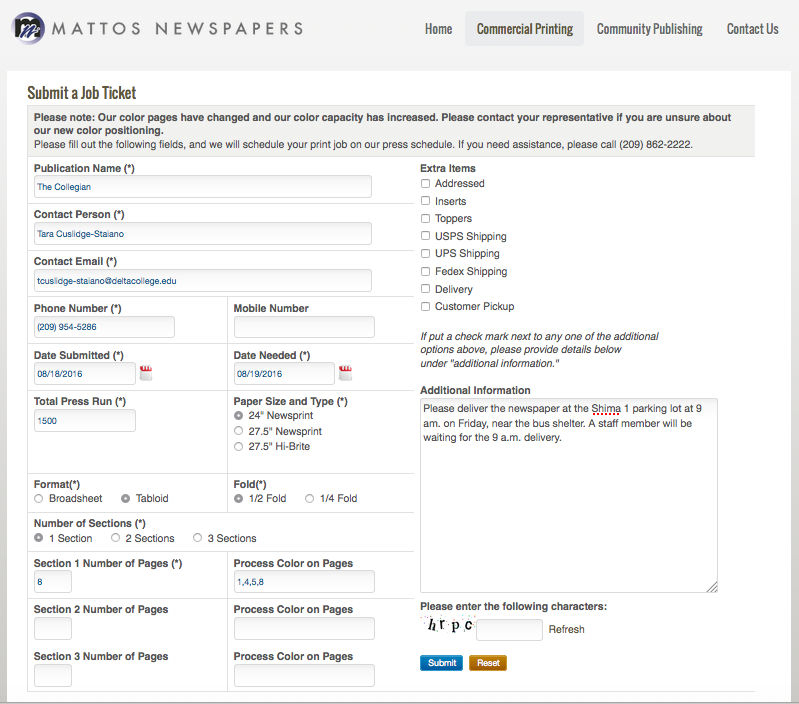
NOTE: In the event of the adviser’s absence, please substitute your name and cell phone number. Make sure you fill out the form to indicate the pages will be sent on a Thursday and the paper will be delivered on a Friday.
The standard paper size is eight pages, with process color on 1,4,5 and 8.
You will receive a confirmation email to the email listed after submitting the form. If you don’t receive a confirmation, or have any questions regarding newspaper contact Graphics/Production Manager Chris Cline at (209) 243-8109 or Publisher Susan Mattos at (209) 243-8101.