• About Us
  • Collegian Digital Archive
  • Publication dates
  • About Us
  • Collegian Digital Archive
  • Publication dates
Home/Knowledge Base/Page movement to publisher/Uploading to Issuu

Uploading to Issuu

57 views 0

After the paper is done, a digital version needs to be uploaded to Issuu.

To do this, visit our Issuu page at issuu.com/deltacollegian and login. See the instructor for the login information.

Once you have logged in, hover over the Publish menu, then click on Upload.
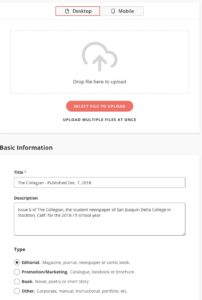
This will bring up the above screen. Click on Select File to Upload and choose the combined .pdf of the issue. Set the Title to “The Collegian – Published DATE” and the Description to “Issue XX of The Collegian, the student newspaper of San Joaquin Delta College in Stockton, Calif for the XXXX school year.” Set the Type to Editorial. Set Availability to Public. Once you’ve done all that, click on Publish.

Was this helpful?

Yes  No
Related Articles
  • Combining pages as one PDF
  • Clearing pages
  • Putting in a print ticket with Mattos Newspapers

No luck finding what you need? Contact Us

Campus Media

Most Visited
  • Link to Pulse 209
  • Social media for Pulse of 209
  • Building a photo gallery with Royal Slider
  • Basic Photoshop editing
  • Using Cheqroom for equipment requests
  • Basic audio editing
  • Tutorials, documents and helpful links
  • Getting to know the Canon Vixia Video Camera
  • Data Retention
  • Page Design Video Tutorial

Putting in a print ticket with Mattos Newspapers  

© The Collegian 2010-2024