• About Us
  • Collegian Digital Archive
  • Publication dates
  • About Us
  • Collegian Digital Archive
  • Publication dates
Home/Knowledge Base/Photojournalism/Adding caption to photo in Photoshop

Adding caption to photo in Photoshop

175 views 0

All images submitted for possible publication in The Collegian need captions embedded in File Info.

Open your image in Photoshop. Make edits to the original image. Right before you are ready to save the image as a .jpeg (NOT RAW), follow the path to File > File Info.
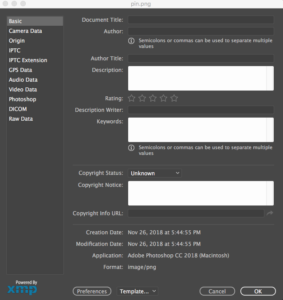
Under the Basic tab, you will be prompted with the screen above. Add your name where it says Author. Add your caption, in Associated Press style, next to Description.

You may also select Copyrighted where is asked for. It may offer an extra level of protection to your image.

Was this helpful?

Yes  No
Related Articles
  • Photojournalism Quickstart Guide
  • Ethics in editing photos
  • Writing a caption

No luck finding what you need? Contact Us

Campus Media

Most Visited
  • Link to Pulse 209
  • Social media for Pulse of 209
  • Building a photo gallery with Royal Slider
  • Basic Photoshop editing
  • Using Cheqroom for equipment requests
  • Basic audio editing
  • Tutorials, documents and helpful links
  • Getting to know the Canon Vixia Video Camera
  • Data Retention
  • Page Design Video Tutorial

  Ethics in editing photos

© The Collegian 2010-2024